

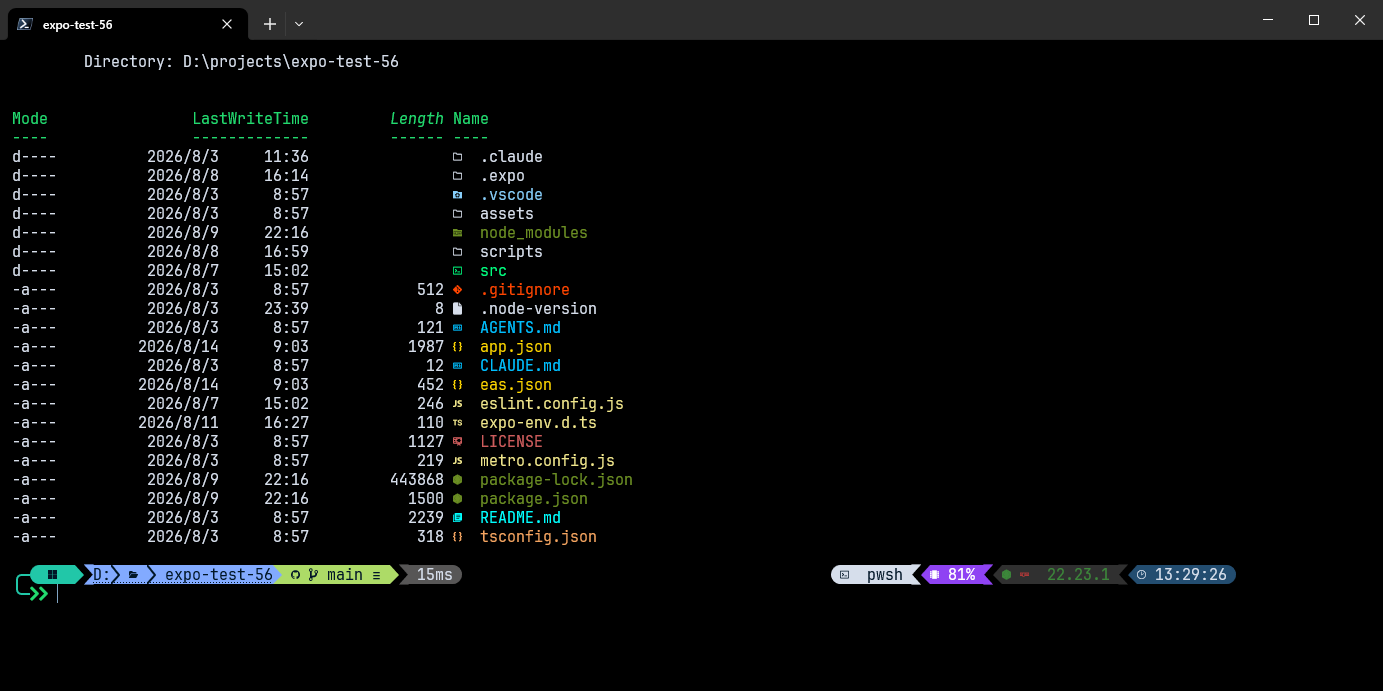
在一台新的 Windows 机器上复现同一套终端外观与增强。全流程约 10 分钟。
配置摘要:
执行须知
全部步骤在 PowerShell 7(pwsh) 中执行,按顺序整段复制运行即可,每步幂等,可重复执行。
第 1 步装完 PowerShell 7 后,若当前不在 pwsh 中,需切到 pwsh 再继续。第 3 步之后有一次进程内 PATH 刷新,无需重启终端。
1. 前置条件
winget install --id Microsoft.PowerShell     --exact --source winget --accept-package-agreements --accept-source-agreements --disable-interactivity
winget install --id Microsoft.WindowsTerminal --exact --source winget --accept-package-agreements --accept-source-agreements --disable-interactivity
$PSVersionTable.PSVersion
已安装时 winget 会报 "已安装最新版本" 并跳过,不影响后续。最后一行应输出 7.x。
2. 安装字体
winget install --id DEVCOM.JetBrainsMonoNerdFont --exact --source winget --accept-package-agreements --accept-source-agreements --disable-interactivityNerd Font 必装,提示符里的图标(分支、文件夹、内存、时钟)都靠它提供字形。
3. 安装工具
foreach ($id in 'JanDeDobbeleer.OhMyPosh', 'junegunn.fzf', 'ajeetdsouza.zoxide') {
winget install --id $id --exact --source winget --accept-package-agreements --accept-source-agreements --disable-interactivity
}
# 三个包都改了 PATH,在当前进程内刷新,免重启终端
$env:Path = ([Environment]::GetEnvironmentVariable('Path','Machine'),
[Environment]::GetEnvironmentVariable('Path','User')) -join ';'
oh-my-posh version; fzf --version; zoxide --version三行版本号都应输出。参考值:Oh My Posh 30.6.2、fzf 0.74.2、zoxide 0.10.0。
4. 安装 PowerShell 模块
Set-PSRepository -Name PSGallery -InstallationPolicy Trusted
Install-Module Terminal-Icons -Scope CurrentUser -Force -AllowClobber
Install-Module PSFzf -Scope CurrentUser -Force -AllowClobber
# PSReadLine 2.4+ 才有 ListView 预测;随 pwsh 预装,故需 -Force
Install-Module PSReadLine -Scope CurrentUser -Force -AllowPrereleasePSReadLine 这行失败不影响其他功能,profile 会自动退回 InlineView 预测。
5. 下载主题包并生成定制主题
Oh My Posh 的 winget 版是 MSIX 打包的,主题不在可访问的目录里,需要单独下载到用户配置目录:
$dest = "$env:USERPROFILE\.config\oh-my-posh"
New-Item -ItemType Directory -Force -Path $dest | Out-Null
$zip = Join-Path $env:TEMP "omp-themes-$PID.zip"
try {
    Invoke-WebRequest -UseBasicParsing -OutFile $zip `
        -Uri 'https://github.com/JanDeDobbeleer/oh-my-posh/releases/latest/download/themes.zip'
    Expand-Archive -Path $zip -DestinationPath (Join-Path $dest 'themes') -Force
} finally {
    Remove-Item $zip -Force -ErrorAction SilentlyContinue
}
"主题数量: " + (Get-ChildItem (Join-Path $dest 'themes') -Filter *.omp.json).Count
应输出 122。文件名带 $PID 是避免并发执行时临时文件互相占用(zip 被占用会导致清理失败)。
接着生成定制版。night-owl 原版带 transient_prompt,模板是一个空格 —— 命令执行完后,那一行的路径、git 状态、耗时会被替换成空白,历史里只剩命令本身。下面这段复制一份并删掉该键,让历史行保留完整的双行提示符:
$src = "$env:USERPROFILE\.config\oh-my-posh\themes\night-owl.omp.json"
$dst = "$env:USERPROFILE\.config\oh-my-posh\night-owl-custom.omp.json"
$j = Get-Content $src -Raw -Encoding UTF8 | ConvertFrom-Json
$j.PSObject.Properties.Remove('transient_prompt')
$j | ConvertTo-Json -Depth 100 | Set-Content $dst -Encoding UTF8 -NoNewline
改副本而非原文件,以后重新下载主题包不会覆盖定制。
若想保留瞬态提示符(历史行更紧凑,只剩命令本身),跳过上面这段,并把第 6 步 profile 末尾的
$ompTheme改成"$env:USERPROFILE\.config\oh-my-posh\themes\night-owl.omp.json"。
关于图标
提示符里的图标(文件夹、git 分支、内存、时钟)全部以 Unicode 码点的形式写在主题 JSON 里,night-owl 共用到 111 个。这些码点落在私有使用区(U+E000–F8FF 和 U+F0000+),普通字体该区间是空的,只有 Nerd Font 才有对应字形 —— 这就是第 2 步字体必装的原因,也是图标显示成方框时该先查字体的原因。
上面的复制脚本经过 ConvertFrom-Json / ConvertTo-Json 往返,已验证 111 个码点原样保留、未被转义破坏。所以按本文档操作得到的图标与源主题完全一致,无需手动处理任何图标字符。
6. 写入 profile
整段执行。已有 profile 会先备份到 .bak-<时间戳>。
外层是单引号 here-string(@'...'@),内部的 $PROFILE、$env: 等不会被提前展开,原样写入文件。结尾的 '@ 必须顶格,不能有缩进。
$body = @'
# ============================================================
# PowerShell Profile
# ============================================================
# --- Node 版本管理 (fnm) ---
if (Get-Command fnm -ErrorAction SilentlyContinue) {
fnm env --use-on-cd --shell powershell | Out-String | Invoke-Expression
}
# --- UTF-8 输出,避免中文与图标乱码 ---
$OutputEncoding = [Console]::OutputEncoding = [Text.UTF8Encoding]::new($false)
# --- PSReadLine: 命令历史预测与回溯 ---
Import-Module PSReadLine
Set-PSReadLineOption -PredictionSource HistoryAndPlugin -ErrorAction SilentlyContinue
# ListView 需要 PSReadLine 2.4+,低版本静默退回 InlineView
Set-PSReadLineOption -PredictionViewStyle ListView -ErrorAction SilentlyContinue
Set-PSReadLineOption -EditMode Windows
Set-PSReadLineOption -HistoryNoDuplicates
Set-PSReadLineOption -Colors @{
Command = "#82AAFF" # night-owl 蓝
Parameter = "#C792EA" # 紫
String = "#ECC48D" # 暖橙
Operator = "#7FDBCA" # 青绿
Variable = "#ADDB67" # 绿
Comment = "#637777" # 灰
Number = "#F78C6C" # 橙
}
Set-PSReadLineKeyHandler -Key UpArrow -Function HistorySearchBackward
Set-PSReadLineKeyHandler -Key DownArrow -Function HistorySearchForward
Set-PSReadLineKeyHandler -Key Tab -Function MenuComplete
Set-PSReadLineKeyHandler -Key Alt+d -Function DeleteWord
# --- 文件图标 (ls/dir 彩色图标) ---
Import-Module Terminal-Icons -ErrorAction SilentlyContinue
# --- PSFzf: Ctrl+R 模糊搜历史, Ctrl+T 模糊找文件 ---
if (Get-Command fzf -ErrorAction SilentlyContinue) {
Import-Module PSFzf -ErrorAction SilentlyContinue
Set-PsFzfOption -PSReadlineChordProvider 'Ctrl+t' -PSReadlineChordReverseHistory 'Ctrl+r'
$env:FZF_DEFAULT_OPTS = '--height=45% --layout=reverse --border=rounded --info=inline ' +
'--color=fg:#d6deeb,bg:-1,hl:#7fdbca,fg+:#ffffff,bg+:#1d3b53,hl+:#21c7a8,' +
'info:#c792ea,border:#5f7e97,prompt:#82aaff,pointer:#ff5874,marker:#addb67,header:#637777'
}
# --- zoxide: z 智能目录跳转 (按使用频率), zi 交互选择 ---
if (Get-Command zoxide -ErrorAction SilentlyContinue) {
Invoke-Expression (& { (zoxide init powershell --cmd z | Out-String) })
}
# --- 别名: 导航 ---
function .. { Set-Location .. }
function ... { Set-Location ..\.. }
function .... { Set-Location ..\..\.. }
function ll { Get-ChildItem @args }
function la { Get-ChildItem -Force @args }
# --- 别名: git ---
function gs { git status --short --branch @args }
function gl { git log --oneline --graph --decorate -20 @args }
function gd { git diff @args }
function gds { git diff --staged @args }
function ga { git add @args }
function gc { git commit @args }
function gco { git checkout @args }
function gb { git branch @args }
function gp { git push @args }
function gpl { git pull @args }
# --- 工具函数 ---
function which ($cmd) { (Get-Command $cmd -ErrorAction SilentlyContinue).Source }
function mkcd ($dir) { New-Item -ItemType Directory -Force -Path $dir | Out-Null; Set-Location $dir }
function reload { . $PROFILE }
# --- 切换提示符主题: theme <名字>, theme 列出全部 ---
function theme ($name) {
$root = "$env:USERPROFILE\.config\oh-my-posh"
$dirs = @($root, (Join-Path $root 'themes'))
if (-not $name) {
$dirs | ForEach-Object { Get-ChildItem $_ -Filter *.omp.json -ErrorAction SilentlyContinue } |
ForEach-Object { $_.Name -replace '\.omp\.json$', '' } | Sort-Object -Unique
return
}
# 允许 theme night-owl-custom 与 theme night-owl-custom.omp 两种写法
$stem = $name -replace '\.omp$', ''
$f = $dirs | ForEach-Object { Join-Path $_ "$stem.omp.json" } | Where-Object { Test-Path $_ } | Select-Object -First 1
if ($f) { oh-my-posh init pwsh --config $f | Invoke-Expression }
else { Write-Host "未找到主题: $name" -ForegroundColor Red }
}
# --- Oh My Posh 提示符 (放最后, 确保不被覆盖) ---
if (Get-Command oh-my-posh -ErrorAction SilentlyContinue) {
# 定制版: 去掉了 transient_prompt, 历史行保留完整提示符
$ompTheme = "$env:USERPROFILE\.config\oh-my-posh\night-owl-custom.omp.json"
if (Test-Path $ompTheme) {
oh-my-posh init pwsh --config $ompTheme | Invoke-Expression
} else {
oh-my-posh init pwsh | Invoke-Expression
}
}
'@
New-Item -ItemType Directory -Force -Path (Split-Path $PROFILE -Parent) | Out-Null
if (Test-Path $PROFILE) {
Copy-Item $PROFILE "$PROFILE.bak-$(Get-Date -Format 'yyyyMMdd-HHmmss')" -Force
}
Set-Content $PROFILE $body -Encoding UTF8
"profile 已写入: $PROFILE"每一块都做了存在性判断,所以缺某个工具时不会报错,只是该功能不生效。
若执行策略拦住了 profile 加载:
Set-ExecutionPolicy -Scope CurrentUser -ExecutionPolicy RemoteSigned -Force7. 配置 Windows Terminal
整段执行。这段解析 settings.json 后按键合并再回写,不覆盖整个文件 —— 现有的 profile 列表、GUID、快捷键都保留。执行前自动备份。
Windows Terminal 至少启动过一次才会生成 settings.json;文件不存在时这段会跳过并提示。
$scheme = [ordered]@{
    name = 'Night Owl'
    background = '#000000'; foreground = '#D6DEEB'
    cursorColor = '#80A4C2'; selectionBackground = '#1D3B53'
    black = '#011627'; red = '#EF5350'; green = '#22DA6E'; yellow = '#ADDB67'
    blue = '#82AAFF'; purple = '#C792EA'; cyan = '#21C7A8'; white = '#FFFFFF'
    brightBlack = '#575656'; brightRed = '#EF5350'; brightGreen = '#22DA6E'
    brightYellow = '#FFEB95'; brightBlue = '#82AAFF'; brightPurple = '#C792EA'
    brightCyan = '#7FDBCA'; brightWhite = '#FFFFFF'
}

$paths = @(
    "$env:LOCALAPPDATA\Packages\Microsoft.WindowsTerminal_8wekyb3d8bbwe\LocalState\settings.json"
    "$env:LOCALAPPDATA\Packages\Microsoft.WindowsTerminalPreview_8wekyb3d8bbwe\LocalState\settings.json"
) | Where-Object { Test-Path $_ }

if (-not $paths) { "未找到 Windows Terminal 配置,先启动一次终端再重跑本步" }

foreach ($wt in $paths) {
    Copy-Item $wt "$wt.bak-$(Get-Date -Format 'yyyyMMdd-HHmmss')" -Force
    $s = Get-Content $wt -Raw -Encoding UTF8 | ConvertFrom-Json

    # 按 name 替换,避免重复追加
    $s.schemes = @(@($s.schemes | Where-Object { $_.name -ne 'Night Owl' }) + [pscustomobject]$scheme)

    if (-not $s.profiles.PSObject.Properties['defaults']) {
        $s.profiles | Add-Member defaults ([pscustomobject]@{}) -Force
    }
    $d = $s.profiles.defaults
    $d | Add-Member colorScheme    'Night Owl' -Force
    $d | Add-Member cursorShape    'bar'       -Force
    $d | Add-Member font           ([pscustomobject]@{ face = 'JetBrainsMonoNL Nerd Font Mono'; size = 11 }) -Force
    $d | Add-Member opacity        100         -Force
    $d | Add-Member padding        '12'        -Force
    $d | Add-Member scrollbarState 'hidden'    -Force
    $d | Add-Member useAcrylic     $false      -Force

    $s | ConvertTo-Json -Depth 100 | Set-Content $wt -Encoding UTF8
    "已更新: $wt"
}
background 纯黑必须配 useAcrylic: false + opacity: 100。开了亚克力半透明,桌面透光会把纯黑染成灰蓝,拿不到真正的黑。想要雾面黑就把 useAcrylic 设 $true、opacity 设 85 左右,但那不是纯黑。
background是#000000,色板里的black仍是 night-owl 原本的#011627—— 前者是终端底色,后者是 ANSI 0 号色,两回事。
8. 重启并验证
关掉所有终端窗口重开(PATH 与字体需要新进程)。应看到双行提示符:
╭─   D:   projects   test  0ms                    pwsh  53%  11:23:16
╰─ ❯
把下面整段贴进终端,逐项自检:
$ok = $true
function Chk($name, $cond, $hint) {
    $s = if ($cond) { 'OK  ' } else { $script:ok = $false; 'FAIL' }
    "  [$s] $name" + $(if (-not $cond -and $hint) { "  -> $hint" })
}
"检查结果:"
Chk 'PowerShell 7+'    ($PSVersionTable.PSVersion.Major -ge 7) '当前不是 pwsh'
Chk 'oh-my-posh'       ([bool](Get-Command oh-my-posh -EA SilentlyContinue)) '重开终端刷新 PATH'
Chk 'fzf'              ([bool](Get-Command fzf -EA SilentlyContinue)) '重开终端刷新 PATH'
Chk 'zoxide'           ([bool](Get-Command zoxide -EA SilentlyContinue)) '重开终端刷新 PATH'
Chk 'Terminal-Icons'   ([bool](Get-Module -ListAvailable Terminal-Icons)) 'Install-Module Terminal-Icons'
Chk 'PSFzf'            ([bool](Get-Module -ListAvailable PSFzf)) 'Install-Module PSFzf'
Chk 'PSReadLine 2.4+'  ([bool]((Get-Module -ListAvailable PSReadLine).Version | Where-Object { $_ -ge [version]'2.4.0' })) '可选: 升级以获得 ListView'
$nf = @('HKLM:\SOFTWARE\Microsoft\Windows NT\CurrentVersion\Fonts','HKCU:\SOFTWARE\Microsoft\Windows NT\CurrentVersion\Fonts') |
    Where-Object { Test-Path $_ } | ForEach-Object { (Get-ItemProperty $_).PSObject.Properties.Name } |
    Where-Object { $_ -match 'JetBrainsMono.*NF|JetBrainsMono Nerd' }
Chk 'Nerd Font 已安装'  ([bool]$nf) '装 DEVCOM.JetBrainsMonoNerdFont'
$cfg = "$env:USERPROFILE\.config\oh-my-posh\night-owl-custom.omp.json"
Chk '定制主题存在'      (Test-Path $cfg) '重跑第 5 步'
Chk 'profile 存在'      (Test-Path $PROFILE) '重跑第 6 步'
if (Test-Path $cfg) {
    Chk '瞬态提示符已移除' (-not (Get-Content $cfg -Raw -Encoding UTF8 | ConvertFrom-Json).transient_prompt) '重跑第 5 步的删除操作'
}
""
if ($ok) { "全部通过。" } else { "有项目未通过,见上方提示。" }再手动确认三件事:ls 显示彩色文件图标、Ctrl+R 弹出模糊搜索框、输入命令前几个字母后按 ↑ 能按前缀回溯历史。
用法速查
目录跳转(zoxide):z test 按使用频率跳到匹配目录,zi 交互式选择。需要先 cd 过一次该目录,zoxide 才有记录。
模糊搜索:Ctrl+R 搜历史命令,Ctrl+T 搜当前目录下文件并插入路径。
切换主题:theme 列出全部 123 个,theme catppuccin_mocha 当场切换(仅当前会话)。永久生效需改 profile 末尾的 $ompTheme。名字带不带 .omp 后缀都能识别。
别名:
排错
图标显示成方框或问号 — 字体没生效。确认 Windows Terminal 字体是 JetBrainsMonoNL Nerd Font Mono(名字必须完整,JetBrainsMono NL 不带 Nerd Font 的变体没有图标字形)。装完字体要重启终端。
提示符还是默认的 PS C:\> — profile 没加载或 oh-my-posh 不在 PATH。跑 Test-Path $PROFILE 和 Get-Command oh-my-posh。注意 PowerShell 5.1 和 7 的 profile 路径不同(Documents\WindowsPowerShell\ vs Documents\PowerShell\),确认你在 pwsh 里。
z 或 fzf 找不到 — winget 改的 PATH 需要新进程。彻底关掉终端重开,别只开新标签页。
中文乱码 — profile 里的 UTF-8 那行没生效,或终端字体不支持中文。JetBrainsMono 本身不含中文字形,会回退到系统字体,通常正常。
历史行的路径块消失了 — 说明当前用的是带 transient_prompt 的原版主题。确认 $env:POSH_CONFIG 指向 night-owl-custom.omp.json。
PSReadLine 报 "predictive suggestion feature cannot be enabled" — 只在输出被重定向的非交互场景出现(比如 pwsh -Command),交互式终端里无影响,可忽略。
涉及的文件
迁移到新机器时,前两个文件可以直接拷过去(装好第 3、4 步的工具后),比手抄快。终端 settings.json 建议手动合并而非整体覆盖,因为里面含机器特有的 profile GUID。
PowerShell 终端主题配置
http://localhost:8090/archives/wei-ming-ming-wen-zhang-AMGUIuwx
评论